Frequently asked questions
Everything you need to know about our deliveries
Booking, tracking, packaging, invoicing, insurance: the answers to the questions we are asked most, for businesses and couriers alike.
For businesses
Can I book a delivery with several destinations?
Of course! There is no limit to the number of destinations you can include in a delivery.
To add a destination, simply select “Add a new destination” once you have entered the first recipient.
If your delivery has to be made in a specific order, you can say so in the additional information.
Can I do night deliveries?
Yes, Shippr offers night delivery jobs, which suit self-employed delivery drivers with a category B licence particularly well. These jobs are often urgent deliveries, or deliveries scheduled outside normal hours. If you are a self-employed courier with some flexibility, they can be a source of extra work.
Can I get proof that my parcel was delivered?
Once the delivery is complete, you can look through the history of every delivery you have made. In the details of a delivery you will find the signed receipt and a proof photo for each destination.
Can I have several accounts for my company?
Yes — every partner using the platform must have their own account in the app.
If you run a company, you can of course decide who works with you and whether prices are visible to them, and invoice your employees’ services at the end of the month under the same VAT number.
We do want to stress that everyone making a delivery must have their own account. Without it, support and the customer have no official way to follow the route of their goods or to get accurate delivery time estimates.
A company manager cannot currently assign deliveries to their own employees, but we are working on a project to make that possible in the near future.
How can I track the progress of my delivery?
Once you have created your delivery, you can check all of its details at any time.
You will find:
- The status of your delivery (created, assigned, imminent, in progress, delivered)
2. A map showing your driver’s route and real-time arrival time
3. The full detail of your delivery (driver’s arrival, pickup, destinations and price)
4. The receipt signed by each recipient once the delivery is complete
How do I connect my Shopify store to Shippr?
We have prepared two guides for this. The first explains how to install the Shippr plug-in on your Shopify store. Once the plug-in is in place, the second guide explains how it works.
How do I follow the progress of my Shippr application?
If you are already in the registration process, check your emails. They will keep you informed at every stage of your application. If you have not received an email, check your spam folder as well.
How do I invoice?
Once a month you will get a notification letting you generate your invoice automatically in the app. That invoice is processed by our accounting team, and the transfer is made through your Stripe account within a few working days.
Need help with your first invoice at Shippr? Here is a step-by-step explanation.
When should you generate your invoices at Shippr?
You can generate your invoices once a month, directly in the Shippr app.
Please note: before you generate your invoice, it is essential to check that all your deliveries are closed and that all the information is correct.
A delivery is closed once it has been invoiced to the customer. To find out, check whether it appears in the document listing all the deliveries you completed before your invoice is generated. Then check that all the information on the invoice you are about to generate is correct.
EXAMPLE: imagine it is 1 February. You want to generate your January invoice, but you notice that your last delivery, on 31 January, is not closed yet. You will therefore have to wait for that last delivery to be closed before you can generate your complete invoice for January.
How do you generate your invoices in the Shippr app?
Let us take the example of John, a partner courier at Shippr, who wants to generate his invoice for January 2022.
As we can see here, John made 2 deliveries in January.
It is 1 February 2022, and every delivery John made is closed, which means he can generate his invoice.
Step 1: go to the invoices tab
- Go to the Profile tab
- Then tap Payments
- And finally tap My invoices

Step 2: check the information on the invoice
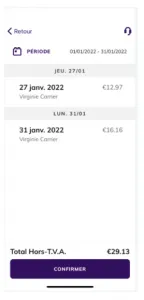
At this step, tap the invoice to check three essential things:
- Are all your billing details correct?
- Is every delivery you made during the month present, at the right rate?
- And finally, are the total amount excluding VAT and the VAT rate both right?
Once you have checked and confirmed those three things, tap Confirm.
What if one of them is wrong?
- Do not generate your invoice
- Send an email to accounting@shippr.io explaining the error you have found
- Wait to hear back from our team before generating your invoice
EXAMPLE
We can see that John does have an invoice to generate for January (1 to 31 January).
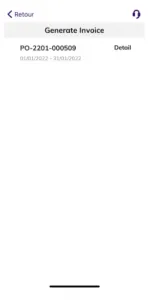
Tapping the details, he checks those 3 pieces of information.
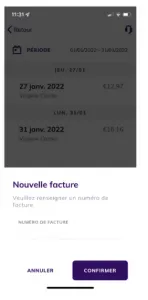
Step 3: name and generate the invoice
You can now generate your invoice for the month.
Before that, you have to give the invoice a number, so you can name it and file it according to your own accounts.
EXAMPLE
In our example, John can now generate his invoice for January 2022.
- He decides to name it: 1234
- Once the number is written, tap Confirm.
Your invoices screen now shows this new invoice, named 1234, as a PDF.
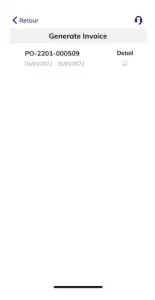
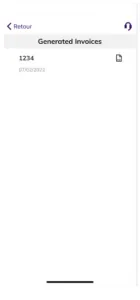
John can then download it by tapping the PDF icon and add it to his own paperwork.
Please note: this can take a few minutes.
When is your invoice paid out?
When you create your invoice in the Shippr app, it is sent to Stripe automatically 15 days after it is generated.
The next day, Stripe transfers the funds to your bank account. You can then expect the money to reach your account within a few days of that transfer.
Please note: unfortunately, the transfer time between Stripe and your bank is outside our control. It varies from bank to bank and depends on weekends and public holidays.
EXAMPLES
Let us go back to our earlier example.
Scenario 1:
John generated his January invoice on 1 February.
- The invoice date will be 16 February (1 + 15 days).
- Stripe will make the transfer on 17 February.
- And you will receive the payment in your bank account on one of the working days that follow (that is, excluding Saturday and Sunday).
Scenario 2:
John generated his January invoice on 4 February.
- The invoice date will be 19 February (4 + 15 days).
- Stripe will make the transfer on 20 February.
- And you will receive the payment in your bank account on one of the working days that follow.
Why do I have to set up a Stripe account to be paid?
We put this system in place to make your payments simpler and automatic. It cuts the time we spend processing your invoices considerably, while standardising the data so we can serve you better.
On top of that, Stripe is recognised for its level of security. The platform works with big names such as Booking.com.
Creating your Stripe account in the Shippr app is required in order to work with us. Without it, we have no way of paying you for the deliveries you have made.
How do you create your Stripe account?
Once your registration is complete, you are invited to download the Shippr app and log in.
From there you can move around the app and create your Stripe account. To do so:
- In your Shippr app, go to your profile
- Tap “Create my Stripe account”
- Follow the instructions to set up your Stripe account
- Stripe then verifies your details
- You receive a confirmation email
Your Stripe dashboard in the Shippr app
Now that you have set up your Stripe account inside your Shippr app, you have access to a dashboard. It gives you visibility on several things you can check at any time.
The Stripe dashboard shows:
- your bank account details
- the list of transactions from Shippr
- the amount you will receive at your next payout
- your invoices
How do I know if my parcel has arrived at its destination?
Once the parcel has been delivered, your order status will read “Delivered”. From that point you can see the recipient’s signature confirming they received your parcel.
To do so, go to your customer area and check the details of your delivery order.
How do I manage my stock well?
Organisation is a decisive step for any business, and managing your stock efficiently starts there. With a ship-from-store strategy in particular, stock moves twice as fast. The whole difficulty lies in keeping both the physical shop and the online shop updated instantly. Handling sales peaks, clearing all your goods… Find out everything you need to know about stock management, and 11 methods for doing it well.
Need software to help you manage your stock? Discover our top 13 best tools.
How do I pack a fragile parcel?
Protecting fragile items properly is essential. Use good-quality double- or triple-wall cardboard, depending on how heavy your goods are. Choose a box that is close to the size of your product, so you can wedge it in and leave no empty space.
For a trouble-free delivery, make sure the shipping label is stuck to the top of your parcel. The label, and its barcode in particular, must be legible in full. Then hand your fragile parcel to a carrier you trust.
How do I send a large parcel?
With Shippr, sending a large parcel is easy and safe. To tell us that a parcel is large, simply enter its details and tick the box matching the weight and volume of your delivery in your dashboard. After that? We take care of the rest.
How do I tell Shippr that my delivery is fragile?
When you create a fragile delivery in your Shippr dashboard, it is important to tell us in the information you provide.
To do so, tick the “fragile parcels” box in the “other details” section as you fill in the delivery information.
How do I weigh a parcel without scales?
Did you know you can build your own scales? All you need is a coat hanger, your parcel, some reference weights and two bags. Hang the coat hanger from a support and attach a large bag to each end. Put your parcel in one bag and add reference weights to the other until the two balance.
Is insurance included?
Your goods are covered in the event of:
- damage
- loss
- theft
up to a maximum of €500.
That amount covers your whole shipment, however many items it contains.
For more information, see our terms and conditions.
Need to make a claim? Contact us, choose “Something else” as the subject and describe the problem. We will get back to you as soon as possible.
What does the Blank and Shippr partnership involve?
Through Blank’s partnership with Shippr, Shippr partner couriers in France receive €100 when they open a Blank account.
Blank is an app built specifically for self-employed people, combining a business account with administrative and financial management tools. It makes life easier for the self-employed by giving them what they need to get started and save time every day, so they can focus on their core business. The app supports them in running their business day to day with modern banking and accounting features, customer management, insurance and customer support.
Visit the dedicated page on the Blank and Shippr collaboration to find out more.
When and how am I paid for the deliveries I make?
Every month, Shippr invoices the customers who use its delivery service.
Once those customers have been invoiced, you can create your own invoice directly in the app and send it to us. The transfer is then made within 15 days to the bank account you gave in your Stripe profile.
Where can I work with Shippr?
Our service operates in Paris and across the Île-de-France region, and in Brussels and its 19 municipalities.
Where is my delivery driver?
Once you have created your delivery, you will find the following information:
1. The status of your delivery (created, assigned, imminent, in progress, delivered).
2. A map showing your driver’s route and real-time arrival time.
Who pays: me or my customers?
Whether you charge your customers for the delivery or offer it free of charge, we always send the invoice to the party placing the order — that is, you.
For couriers
Can I ask someone else to do the delivery?
You cannot be replaced by someone who is not registered with Shippr. You can, however, transfer the job to a colleague who is registered with us, by telling us through the support system in your app.
If you cannot honour a delivery you have committed to, there are two options:
- You can unassign yourself from the job in the app, up to 2 hours before the delivery starts.
- To unassign yourself less than 2 hours before the start, you have to contact support, who will decide whether it is possible. If we cannot reach an agreement, you will receive a poor rating.
PLEASE NOTE: sharing your account with another person is strictly forbidden. Neither Shippr nor our customers would be able to use the geolocation system, and handling, which is based on your GPS position, could not be taken into account.
Changing vehicle: what is the procedure?
You can add, edit or remove a vehicle at any time from your profile in the app.
To do so, tap Profile > My vehicles. Every vehicle has to be approved by an operator before it becomes active, so make sure you provide the photos and documents we ask for.
It is also worth knowing that the vehicle type on your profile decides which jobs and volumes you can see in your app, so keeping that list up to date matters.
Do you offer flexi-jobs for couriers?
Shippr offers flexible work for self-employed couriers, ideal for anyone looking to top up their main activity. The jobs can be done during the day or as a night courier, and are available across different sectors depending on demand. That includes work for delivery drivers with a category B licence and for cycle couriers.
How can I work with Shippr as a courier?
If you are a self-employed courier or delivery driver looking for new work, Shippr gives you access to a wide range of delivery jobs matched to your capacity and your schedule. You can find jobs that suit your skills, whether you deliver by scooter or use another means of transport, with or without a category B licence.
How do I keep the cold chain intact?
Our fleet includes several refrigerated and dual-temperature vehicles. Demand for them is high, so please contact us at least one week before the delivery date so we can draw up a quote for the job together.
Our drivers are used to this kind of delivery. Goods can also be carried in insulated boxes. If you supply the boxes yourself and want them back at the end of the delivery, our driver will return them, along with any other goods, to the pickup point or to another destination as you prefer.
No insulated boxes of your own? Get in touch! Our partner can provide the equipment you need to carry out your deliveries in the best conditions.
How do I measure my parcel's dimensions?
If you are sending a parcel in a cardboard box, measure the length, width and height.
If you are sending a pallet, the same three dimensions apply. Note that a standard European pallet measures 120 x 80 x 14.5 cm.
How much will I earn working with Shippr?
Shippr is a platform that connects business customers who need deliveries with a community of self-employed couriers.
We act as an intermediary, giving you the digital infrastructure that makes your day-to-day easier. We cannot set out an income range in advance, because your income depends largely on your own schedule.
What matters is that our prices track the market and that we will always aim to offer you fair pay. You are free to accept a job or not, since the price is shown at the moment you take it.
With that in mind, it is essential to understand why we cannot guarantee a fixed income to the people we work with:
- We do not create the jobs ourselves. The Shippr platform lets registered customers order deliveries.
- A job’s price is calculated from several factors, such as distance, volume, the number of stops on a round, and the handling likely to be involved.
- Your invoice at the end of the month therefore also depends on how many jobs you have done, which makes a fixed income impossible for us to predict.
I need to collect goods after my delivery — how do I do that?
If you have containers to collect at the end of your delivery (crates, insulated boxes, goods, and so on), you can say so directly in your dashboard. Simply answer “Yes” to the question “Is a return needed?”.
In the additional information you can tell the driver what to collect. The return is made to the pickup address. If you want those goods delivered somewhere else, simply add a new destination.
What are the steps to become a Shippr partner?
After registering online, which includes a check of your legal documents, you will get access to your account in the Shippr app. You are then invited to complete your profile (details and photos of your vehicles, Stripe setup so you can receive your monthly payments, and so on).
What does it take to work as a self-employed delivery driver?
As a self-employed delivery driver, you need a valid driving licence — a category B licence for deliveries by car. Good knowledge of urban areas and the ability to plan your journeys efficiently are just as essential to the job. Whether you deliver parcels or work as a courier, Shippr gives you access to a variety of jobs matched to your skills.
What is the maximum volume and weight of the parcels I can send?
When you book a delivery on our platform, all you have to give is the volume of your parcel per recipient (maximum 30 kilos per individual package, maximum 400 kilos in total).
Your delivery is then offered to the carriers who best match your needs, thanks to our algorithms, which calculate the total volume of your delivery.
Parcel types:
- Small: fits in a backpack (55 x 40 x 25 cm)
- Medium: fits in a car boot (100 x 100 x 50 cm)
- Large: fits in a van (250 x 150 x 150 cm)*
Need to send a larger volume? Get in touch!
We are obviously not going to measure your parcels — the volume you give us helps us provide the vehicle best suited to your request.
What opportunities are there for couriers and delivery drivers with Shippr?
Shippr works with self-employed couriers and professional delivery drivers who want to work in goods delivery. Whether you are a scooter courier or a delivery driver, a range of jobs is available: night deliveries, daytime deliveries, and specialised services such as carrying parcels by car or by bike.
When are deliveries available?
Once your account has been created and approved, simply log in to the app to start receiving job offers.
Our service runs from 06:00 to 22:00, 7 days a week, so you can set your own hours and take jobs whenever you want, with no restrictions.
Who can use Shippr's night courier service?
We work with B2B customers only. That means only professional customers and businesses can order a delivery on our platform
UK deliveries
These answers cover our deliveries in the United Kingdom. For Belgium and France, see the other tabs.
How to invoice?
Once a month, you will receive a notification allowing you to generate your invoice automatically via the application. This invoice will be processed by our accounting team and the transfer will be made via your Stripe account within a few working days.
How to measure your large parcel?
When shipping sizable, heavy, or bulky packages, measure and weigh your parcel precisely to determine the suitable large parcel delivery service. Adhering to the maximum weight and dimensions is crucial to prevent rejection during collection or returns at your cost.For more compact items weighing up to 15kg? Check our small parcel delivery solution.
How to send a fragile parcel safely?
To ensure the safe shipment of fragile objects, certain steps are essential. Here are our 5 tips: 1. Make sure you don’t neglect the quality of the materials by investing in fragile cardboard. Instead, use quality double or triple fluted cardboard, depending on the weight of your goods. 2. Choose a cardboard box that is almost the same size as your product. This will allow you to wedge it in and not leave any gaps.3. Make sure you stick the packing slip on the top of your package. This label, and in particular its barcode, must be legible in its entirety. 4. Then entrust your fragile package to a trusted carrier such as Shippr. 5. Take out specific insurance for your fragile parcel shipments.
How will I be informed about changes, news, and updates?
I’m independent, can I still use the app?
Yes, independent couriers can use the Shippr app. The requirement for VAT and company numbers is part of our registration process and does not mean that our platform is only for enterprises. Self-employed individuals are welcome to use our services.
Only have huge trucks, can I deliver with you?
Yes, Shippr accommodates all vehicle types, including large trucks.
What is a large parcel?
A parcel is considered large when it exceeds 2.5m in length, 5m in girth, and 30kg in weight. For all large parcel deliveries, tracking will be provided.
What will I be asked to deliver?
At Shippr, you could be delivering all sorts of stuff! We’ve got everything from small packages to big parcels across different industries. And it’s not just food, we mean everything - documents, clothes, furniture, you name it!
What will I deliver with Shippr?
When and how do I get paid for the deliveries I make?
Once the invoices have been issued, you can create your invoice directly in the app and send it to us. The transfer will then be paid within 15 days to the bank account you have entered in your Stripe profile.